Connect any AI agent to social media with one MCP server
Paste one address into ChatGPT, Claude, Cursor or any AI app that supports MCP, then just ask. Your agent writes, schedules and publishes posts to all top platforms through an agentic social media scheduler, and every one shows up in your PostEverywhere calendar.
Get started from as little as $9 per month. $0 due today, cancel anytime.


 Works with any AI agent


Used by 2,831 happy customers
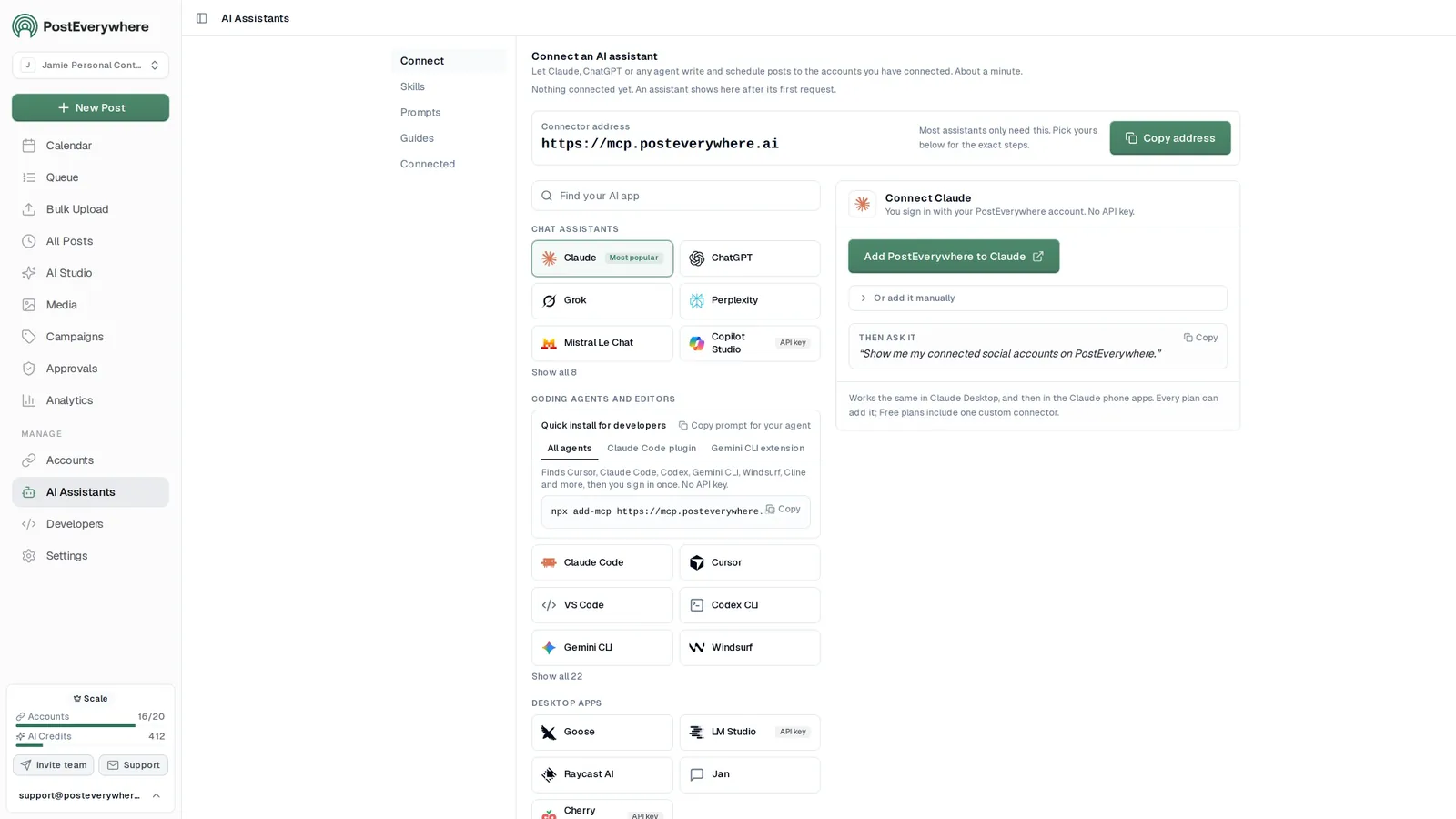
Connect your AI agent
Choose your assistant and connect in seconds.
Works on every Claude plan, including free. Full Claude guide
- 1
Add to Claude
One click from Claude’s connector directory.
- 2
Sign up or sign in
Takes seconds, then you’re sent straight back.
- 3
Ask Claude
“Plan and schedule my posts for next week.”
Connect in seconds
Connect your AI agent to social media
- Start your trial.
- Every PostEverywhere plan includes the hosted MCP server, the REST API and the SDK.
- Add the connector address to your agent.
- Paste https://mcp.posteverywhere.ai into ChatGPT, Claude, Cursor or any MCP client. There is nothing to install.
- Connect your social accounts.
- Authorize the platforms you want your agent to publish to, across all top platforms.
- Ask your agent to schedule a post.
- “Schedule this to LinkedIn and X for Tuesday at 9am.” It writes, schedules and publishes for you.
$0 due today, cancel anytime
What your agent can do
Skills teach your agent the job. The 39 tools do the work.
- Plan a content calendarPlan a week or month of posts and fill your queue.
- Repurpose contentTurn a blog post, transcript or newsletter into a set of posts.
- Cross-post a videoOne video to TikTok, Reels, Shorts and more, with the right caption for each.
- Fix failed postsFind posts that didn't go out, explain why, and fix them.
- Weekly reportA short weekly or monthly report, ready to paste into an email.
- Brand voiceLearn how you write from your own posts and keep new posts in your voice.
Setup guides
The social media MCP server for AI agents
PostEverywhere runs a hosted social media MCP server at mcp.posteverywhere.ai. Model Context Protocol (MCP) is the open standard that lets AI agents call external tools, so once it is connected, ChatGPT, Claude, Cursor or any other MCP client can schedule social media posts, generate captions (and images, on the full MCP server), retry failed posts and read analytics across all top platforms in plain language. Pick your assistant for its setup guide, including the prerequisite each one hides behind.
- ChatGPTCustom MCP server under PluginsSetup guide
- ClaudeOne click from Claude's connector directorySetup guide
- Claude CodeOne command in your terminalSetup guide
- CodexA table in ~/.codex/config.tomlSetup guide
- GeminiThrough Gemini CLI or the Gemini APISetup guide
- GrokCustom connector at grok.com/connectorsSetup guide
- PerplexityCustom remote MCP connectorSetup guide
- Microsoft CopilotThrough Copilot StudioSetup guide
- CursorAdd it as an MCP serverSetup guide
- n8nThe MCP Client Tool nodeSetup guide
- OpenClawYour OpenClaw agent, through our APISetup guide
- WindsurfA server entry in mcp_config.jsonSetup guide
- ClineThe MCP Servers panel in VS CodeSetup guide
- Meta MuseCustom connector: MCP server or OpenAPISetup guide
- OpenAI DotsCustom MCP connector in ChatGPTSetup guide


Using ChatGPT? Add it under Plugins
On chatgpt.com open Plugins → + → Add custom MCP server. Web only, and not on the free ChatGPT plan. You no longer need to turn on Developer mode.
Using Claude? It is in the connector directory
Signed-in Claude users add PostEverywhere in one click and approve access. There is no API key to copy.
Open the Claude listingZed or your own agent?
Use the connector address with an API key, or run the open-source server on your own machine. Only ChatGPT varies what it allows by plan.
See every configConnected already? Our step-by-step guide to scheduling posts with MCP covers time zones, per-platform captions and checking what went out. Still choosing an assistant? Compare the best AI social media agents, see which other vendors run an MCP server, or read our State of AI Agents in Social Media report for first-party data on MCP adoption and which assistants people connect. Prefer to self-host? The open-source @posteverywhere/mcp server exposes the same 39 tools.
What your agent can do
Agent prompts for scheduling social media posts
Paste any of these into your agent once it is connected. Each one maps onto real MCP tools covering scheduling, AI captions and analytics, with no glue code.
- Schedule across platforms.
- “Schedule this draft to LinkedIn and X for Tuesday at 9am Pacific. Optimise the caption for each platform.”
- Recover failed posts.
- “Retry every TikTok post that failed in the last 7 days, but skip any video over 60 seconds.”
- Report on results.
- “Pull my Instagram engagement metrics for last month, then suggest three posting-time changes for next month.”
- Post at your best time.
- “Write a post about our spring sale and schedule it on Instagram and LinkedIn at my best time.” Your agent reads your best times with get_best_times and tells you which time it picked.
- Create in bulk.
- “Generate three caption variants for a product-launch carousel, then bulk-schedule them across the week.”
- Watch for problems.
- “Subscribe to post.failed and account.disconnected events and route them to my Discord webhook.”
- Repurpose long-form.
- “Turn this blog post into an X Article with a cover image and schedule it for Thursday at 9am.”
Plan next week's posts for all my accounts and schedule one a day at 9am.
Used PostEverywhere
list_accounts8 accountsget_platform_rulesLimits checkedgenerate_caption×55 captionsbulk_create_posts5 posts scheduled
Done. Five posts are scheduled for Monday to Friday at 9:00 AM, each one tailored for its platform. They are in your calendar if you want to change anything.
Mon
9:00 AM
Tue
9:00 AM
Wed
9:00 AM
Built for builders
Why agent builders pick PostEverywhere
The execution layer is the boring half of an agent. It should also be the reliable half. Your agent gets the same surface a person gets in the dashboard, through 39 MCP tools and 49 REST endpoints.
- 39 MCP tools, not five.
- The full surface: posts, campaigns, webhooks, bulk operations, media, account health, analytics and caption generation. Your agent can reason about all of it, not just create_post.
- Webhooks instead of polling.
- 15 event types, so your agent reacts when something happens instead of burning tokens checking every minute.
- Bulk operations, 50 posts per call.
- A month of daily posts is scheduled in one request, and bulk retry by filter recovers a whole batch from a flaky platform in one call.
- Pre-flight account health.
- get_account_health returns can_post, token expiry and recent failures, so your agent checks before it posts and a stale token never silently stops a run.
- You stay in control.
- Everything your agent schedules lands in your PostEverywhere calendar, where you or your team can edit or delete it before it goes out.
- 08:55MCP tool
get_account_healthcan_post: true - 08:55MCP tool
bulk_create_posts30 scheduled - 09:00Webhook
post.published - 09:00Webhook
post.failed - 09:01MCP tool
retry_failed_posts1 retried - 09:02Webhook
post.published
Tool reference
Every tool on the social media MCP server
The complete tool list, grouped by what it touches. This is the same surface as the REST API, exposed as MCP tools. Full parameters and response shapes for each are in the API reference.
Posts and scheduling
11create_postschedule_postbulk_create_postsget_postlist_postslist_posts_advancedupdate_postdelete_postget_post_resultsretry_failed_postretry_failed_posts
Accounts and identity
8list_accountsget_accountget_account_healthget_meget_analytics_summaryconnect_credential_accountcreate_connect_linkcreate_reconnect_link
Webhooks
6create_webhookget_webhooklist_webhooksupdate_webhookdelete_webhooktest_webhook
Campaigns
5create_campaignget_campaignlist_campaignsupdate_campaigndelete_campaign
Media
4upload_media_from_urlget_medialist_mediadelete_media
AI generation
2generate_captiongenerate_image
Queue and best times
2get_queueget_best_times
Platform rules
1get_platform_rules
All 39 are on the full server at mcp.posteverywhere.ai. Connecting through Claude's connector directory gives you every tool except generate_image.
Real agent patterns
What you can build
Five agent patterns you can build on this API. For a full walkthrough, read how to build an AI social media agent; for agency setups across client workspaces, see multi-account management.
- Daily content agent.
- Watches your blog RSS, drafts platform-specific captions, generates an image and schedules across LinkedIn, X and Threads.
- Self-healing retry agent.
- Subscribes to post.failed webhooks, reads the error, decides whether to re-encode, retime or skip, then calls bulk retry. No human in the loop until something genuinely odd happens.
- Engagement-aware scheduler.
- Pulls the analytics summary weekly, ranks your own posting windows by engagement and rewrites next week's schedule.
- Multi-client agency bot.
- One agent per client, grouped with the campaigns API. get_me tells the agent which workspace it lives in, so the same code runs for client 12 or client 412.
- Repurposing pipeline.
- Takes a YouTube upload and drafts a LinkedIn long post, an X thread or X Article, three Instagram carousel slides and a Bluesky teaser, then schedules each one. Around 8 API calls end to end.
A new post goes up on your blog
RSS feedYour agent drafts a caption for each platform
generate_captionIt generates an image to go with it
generate_imageSchedules it to LinkedIn, X and Threads
bulk_create_postsHears back the moment each one publishes
post.published
For developers
Your first SDK call
Building a long-running agent rather than working in an editor? The Node.js SDK wraps all 49 REST endpoints with typed resources. Webhooks, campaigns, bulk operations and account health are all on the same client. See the developers page for the full surface.
- MCP server.
- Use the hosted one, or run the open-source server yourself with
npx -y @posteverywhere/mcp. - Node.js SDK.
- A typed client for the whole REST API:
npm install @posteverywhere/sdk. - Command line.
- The PostEverywhere CLI is built for agents, with structured JSON output and a bundled SKILL.md for auto-discovery.
import PostEverywhere from '@posteverywhere/sdk';

const client = new PostEverywhere({
  apiKey: process.env.POSTEVERYWHERE_API_KEY,
});

const post = await client.posts.create({
  account_ids: [123],
  content: 'Shipping today.',
  scheduled_for: '2026-10-20T09:00:00Z',
});Bring your own stack
Works with the agent stack you already run
If your agent can issue a Bearer-authenticated POST, it can use PostEverywhere.
Native MCP clients (zero glue code)
Add the connector address, approve access, and the tools are there.
- ChatGPT
- Claude Desktop
- Claude Code
- Cursor
- Cline
- Windsurf
- Zed
- Codex CLI
Any framework that speaks HTTP
LangChain, CrewAI, AutoGen, LlamaIndex, Vercel AI SDK, OpenClaw, or your own loop with fetch and an LLM of your choice. Either way, your agent can cross-post to every platform through one API.
- LangChain
- CrewAI
- AutoGen
- LlamaIndex
- Vercel AI SDK
Prefer to run it locally?
Local config block for every MCP client
Most people should use the hosted server above, and Claude Code connects to it with one command. To run the open-source server on your own machine instead, every client follows the Model Context Protocol spec, so the same JSON works across Claude Desktop, Cursor, Cline and Windsurf. Zed nests it under context_servers, and Codex CLI uses TOML.
claude mcp add --transport http posteverywhere \
  https://mcp.posteverywhere.ai \
--header "Authorization: Bearer pe_live_YOUR_KEY"~/Library/Application Support/Claude/claude_desktop_config.json (macOS)%APPDATA%\Claude\claude_desktop_config.json (Windows)
{
  "mcpServers": {
    "posteverywhere": {
      "command": "npx",
      "args": ["-y", "@posteverywhere/mcp"],
      "env": { "POSTEVERYWHERE_API_KEY": "pe_live_YOUR_KEY" }
    }
  }
}~/.cursor/mcp.json
{
  "mcpServers": {
    "posteverywhere": {
      "command": "npx",
      "args": ["-y", "@posteverywhere/mcp"],
      "env": { "POSTEVERYWHERE_API_KEY": "pe_live_YOUR_KEY" }
    }
  }
}~/.codex/config.toml
[mcp_servers.posteverywhere]
command = "npx"
args = ["-y", "@posteverywhere/mcp"]
env = { POSTEVERYWHERE_API_KEY = "pe_live_YOUR_KEY" }
The header must be [mcp_servers.posteverywhere] with an underscore: a mistyped header starts cleanly and loads nothing, with no error. The env line is a TOML inline table, so it needs braces and =, not JSON-style colons.
Cline
Same JSON block, added via the MCP Servers panel in VS Code. The panel accepts what you paste without validating it, so a server that will not start is almost always a malformed block.
Windsurf
Same JSON block, file
~/.codeium/windsurf/mcp_config.json. Windsurf reads it at startup rather than watching it, so fully restart after saving. A trailing comma makes the whole file invalid and it fails quietly.Zed
Same shape, nested under
context_serversinstead ofmcpServers, in~/.config/zed/settings.json. A block left undermcpServersis ignored without any error, and Zed validates the whole settings file, so an error elsewhere in it blocks the save.
FAQ
PostEverywhere agents FAQ
Setup, limits and how it compares. For parameters and response shapes, see the docs.
Can I build an AI social media agent with PostEverywhere?
Yes, that is exactly what the MCP server, REST API, and SDK exist for. Point any AI agent (Claude, Cursor, Codex, or your own LangChain or CrewAI loop) at the hosted server and it can draft, schedule, and publish across all top platforms, react to webhook events, and check account health before it posts. Connecting one takes about a minute.
Do I need an API key, or can I use OAuth?
Both. In Claude and ChatGPT you add https://mcp.posteverywhere.ai as a connector and approve access (OAuth, nothing to copy). Code clients such as Cursor, Codex and Claude Code use an API key (starts with pe_live_), which also works across the REST API and SDK.
How is this different from Zapier or n8n?
Zapier and n8n are visual workflow builders, great for "when X, do Y" plumbing. PostEverywhere is the social-media execution layer your code-level agent calls directly. No webhook-to-Zap-to-API hop, no per-task pricing. Your agent reasons in your runtime and posts via one HTTP call.
Does the MCP server work with Cursor, Cline, Windsurf, and Zed?
Yes. Anything that speaks the MCP protocol works. The config block is identical for Claude Desktop, Cursor, Cline, and Windsurf; Zed nests it under context_servers; Codex CLI uses TOML.
Why doesn't the tool show up after I add the config?
Most common cause: npx is not on PATH in the client's environment, or a JSON syntax error in the config. Claude Desktop also needs a full quit and relaunch (not just closing the window). Check the MCP logs in your client if tools are missing.
What if my agent posts the same thing twice?
Subscribe to post.published webhooks and reconcile against your agent's own memory before scheduling more. The posts list endpoint also supports filtering by content search and date range, so the agent can check for near-duplicates first.
Can I see what my AI agent did?
Yes. Every call your assistant makes through the MCP server or the API is listed on the Logs page in PostEverywhere: the tool it called, when, how long it took, whether it worked and the error if it failed. Logs are kept for 30 days on every plan, and secrets such as API keys are redacted.
What's the rate limit?
60 requests per minute and 1,000 per hour per API key. Responses include X-RateLimit headers, and a 429 comes with Retry-After. For bulk publishing, create up to 50 posts in one bulk request instead of looping.
Is the MCP server included in every PostEverywhere plan?
Yes. The hosted MCP server, the REST API and the @posteverywhere/mcp package are included on every plan, from Lite ($9/mo) to Scale ($39/mo). API rate limits are 60 requests per minute and 1,000 per hour per key. Every plan starts with a 7-day trial; a card is required and there is no free plan.
Should I use the hosted server or run the npm package locally?
Hosted for almost everyone: point your client at https://mcp.posteverywhere.ai with OAuth in Claude or ChatGPT, or your API key in code clients, and there is nothing to install or update. Run @posteverywhere/mcp locally when your environment cannot reach external MCP endpoints or you want to pin a version. Both expose the same 39 tools. If you would rather publish from a shell than a conversation, the CLI covers the same API from the terminal.
Is there a social media MCP server?
Yes. PostEverywhere runs a hosted social media MCP server at mcp.posteverywhere.ai with 39 tools; this page lists every tool and setup path. Model Context Protocol is the open standard that lets AI agents call external tools: an assistant can schedule posts, manage campaigns, upload media and read analytics on your behalf, in plain language, without you touching a dashboard. Any MCP-compatible client (ChatGPT, Claude, Cursor, Codex, Cline, Windsurf, Zed) can then post across all top platforms once the server is connected. There is nothing to install with the hosted server, or you can run the open-source @posteverywhere/mcp package locally.
Can my AI agent post at my best time?
Yes. Ask it to post at your best time and it schedules for the next one, using schedule_at: "best_time" on create_post or schedule_post, then tells you which time it picked and what it is based on. The get_best_times tool lists your best times for one or more accounts or a platform, and developers can call GET /v1/best-times on the REST API. PostEverywhere bases these times on when your posts have done best; new accounts start with what works across PostEverywhere on each platform, and some platforms, like X, only get general guidance.
How do I schedule social media posts with MCP?
Connect the PostEverywhere MCP server to your agent, authorize your social accounts, then prompt the agent in plain language, for example "schedule this post to LinkedIn and X for Tuesday at 9am." The agent uses the MCP tools to publish across any of the connected platforms. The hosted server at mcp.posteverywhere.ai needs one URL (OAuth in Claude or ChatGPT, an API key in code clients), with nothing to install.
Can I schedule social media posts from Claude?
Yes. Add PostEverywhere from Claude's connector directory in one click, or add the MCP server to Claude Code with one command, then connect your accounts and ask Claude to draft and schedule posts. Claude calls PostEverywhere's MCP tools directly to publish across all top platforms, so you never leave the chat. Cursor, Codex CLI, Cline, Windsurf, and Zed work the same way.
Does the MCP server work with ChatGPT?
Yes. On chatgpt.com, open Plugins, select +, then Add custom MCP server, paste https://mcp.posteverywhere.ai and approve access to your PostEverywhere account. ChatGPT can then write and schedule posts across all top platforms. Free ChatGPT accounts cannot add custom MCP servers, and OpenAI lists full write support on Business and Enterprise/Edu, so if your plan will not schedule, use Claude, which works on every plan.
Still have questions?
Contact us or browse the full FAQ.
$0 due today, cancel anytime
Included on every paid plan from $9/mo
7-day trial with a card, $0 due today. No separate developer tier and no enterprise call: one key works for the MCP server, the REST API and the SDK.