The social media management platform for teams and their AI agents
Stop juggling apps. Schedule posts, create AI content, track analytics, and manage every account across all top platforms, from one dashboard. Plans from $9/mo.
Get started from as little as $9 per month. $0 due today, cancel anytime.


 Works with any AI agent


Used by 2,831 happy customers
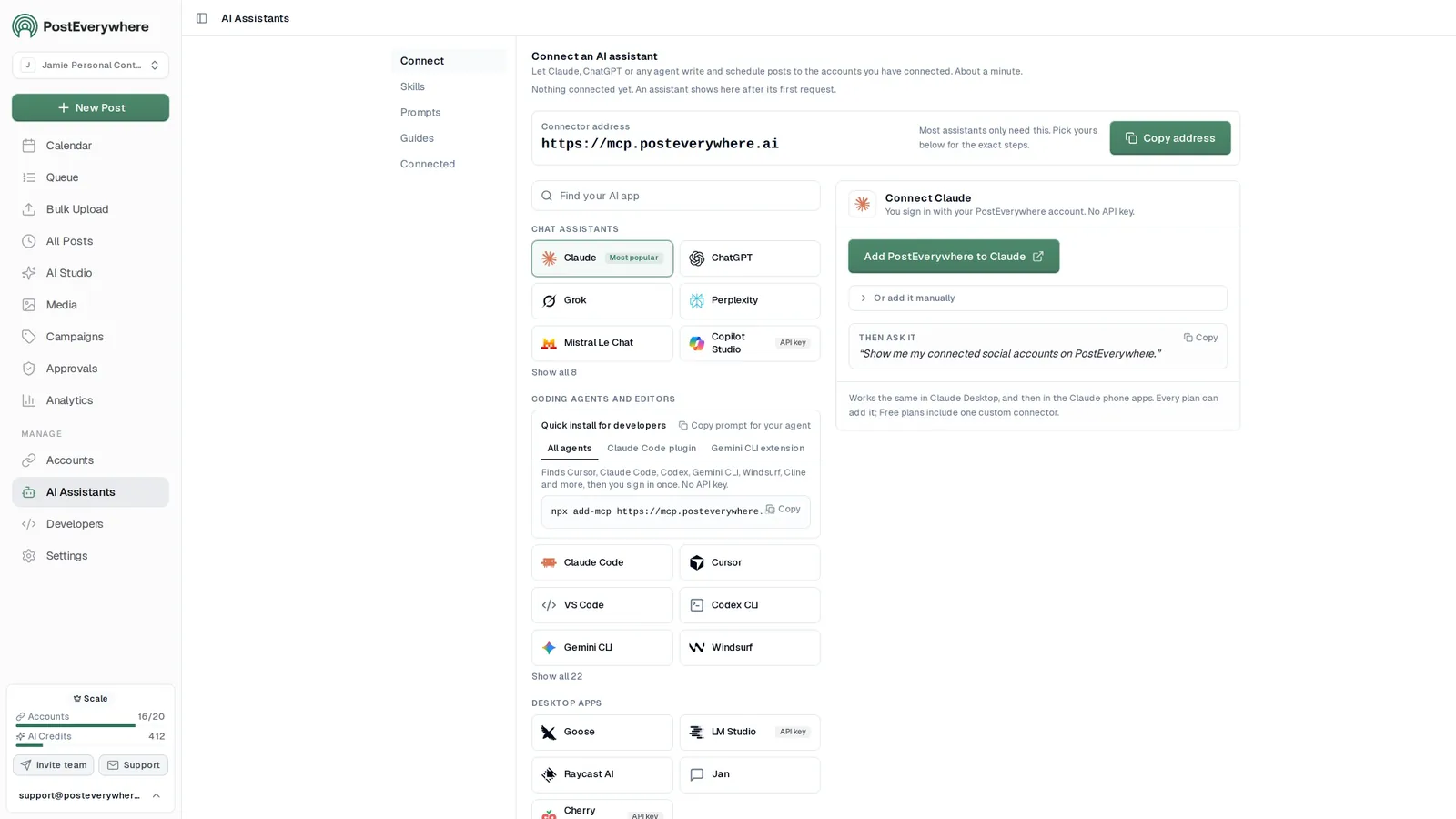
Connect your AI agent
Run your social media from any AI agent
- Connect any AI agent.
- Add PostEverywhere to ChatGPT, Claude, Grok, Perplexity, Cursor or any other AI app that supports MCP with one address. It takes seconds.
- Ask in plain English.
- “Plan next week's posts for all my accounts.” Your agent writes every post for you.
- It schedules and publishes.
- Your agent can post now, schedule for later or save a draft for you to review. Every post lands in your calendar, and scheduled posts go out on time through each network's official API.
$0 due today, cancel anytime
Connect your AI agent
Choose your assistant and connect in seconds.
Works on every Claude plan, including free. Full Claude guide
- 1
Add to Claude
One click from Claude’s connector directory.
- 2
Sign up or sign in
Takes seconds, then you’re sent straight back.
- 3
Ask Claude
“Plan and schedule my posts for next week.”
Ask your agent
See all 15 skills and prompts“Use PostEverywhere to plan next week of posts for all my connected accounts. Suggest one post a day, show me the plan, then schedule it when I say yes.”
View skill“Draft next week of posts for my client in PostEverywhere as drafts for review. Do not publish anything until they approve.”
View skill“Switch to my Acme client in PostEverywhere and show their queue.”
View skill
The basics
What is social media management?
Social media management is the work of planning, creating, scheduling, publishing and measuring content across every network a brand is active on. In practice it covers five jobs.
For the scale of social media today, see Sprout Social's social media statistics and DataReportal's Digital 2026 global overview. Managing that presence well is no longer optional, and doing it across all top platforms by hand no longer fits in a working week.
- Build a content calendar. Decide what goes out, where and when, for every network at once.
- Produce the posts. Write the captions and make the images and video, in a version that suits each platform.
- Publish at the right time. Get each post out on each platform when its audience is around.
- Reply to what comes back. Keep up with the comments and messages your posts start.
- Report on what worked. Measure the results and feed them into next week's plan.
Doing it by hand means repeating those five jobs once per network. A social media management platform collapses them into one workflow, which is the difference between a scheduler that only handles step three and a platform that handles the whole job.
Post to (5 of 8 selected)
Select allLaunch week is here
Plan once, publish everywhere. Schedule your posts to Instagram, LinkedIn, X, Facebook and Threads from one calendar.
What will you ship this week? #contentmarketing #socialmedia
 spring-blend.jpg
How our team plans a whole launch week in one sitting, and the checklist we use for every network.
Launch week, planned in one sitting. The checklist we use for every network 👇
Product demo
See it in action
Watch how PostEverywhere simplifies your social media workflow, from one post to every platform.
Built for AI agents
A social media management tool your AI agent can operate
Most social media management tools assume a person is driving. PostEverywhere assumes it might not be. We run a hosted MCP server, so Claude, ChatGPT, Cursor or any MCP client connects to the same workspace your team uses and can draft, schedule and publish through it directly.
Plan a two-week campaign for our launch and schedule every post.
PostEverywhere
create_campaignProduct Launchlist_accounts5 accountsbulk_create_posts12 posts
Done. I created the Product Launch campaign and scheduled 12 posts in it across Instagram, LinkedIn and X over the next two weeks. They are on your calendar, and the campaign shows their progress on the Campaigns page.
The workspace is the point. An agent you connect works inside the workspace and the accounts you connect, never anyone else's.
Everything lands in one calendar. Your agent can post now, schedule for later or save a draft. Everything it schedules lands in the same calendar, where a person can check, edit or delete it before it goes out.
Pick the right agent. If you are still choosing which agent to connect, we compared AI social media agents on how much of the job each one really does.
Schedule & publish
Social media scheduling across all top platforms
Your entire content strategy lives in one visual content calendar. Drag-and-drop to reschedule, bulk schedule via CSV, and choose your posting times once for every week. No more logging into a different app for every network.
- Visual content calendar.
- Monthly, weekly, and daily views with drag-and-drop. See every scheduled post across all top platforms at a glance.
- Posting times you set once.
- Set recurring openings in the posting queue and every new post takes the next free one. Our best time to post research helps you choose them.
- Cross-platform publishing.
- Create one post, customize per platform, publish everywhere simultaneously. Automatic format and dimension optimization.
Mon
5
9:00 AM
Launch week is here
1:30 PM
Behind the scenes
Tue
6
10:00 AM
5 tips for faster scheduling
5:00 PM
Product teaser
Wed
7
9:00 AM
Customer story
3:00 PM
New templates
Done. 6 posts scheduled for the rest of the week, each one tailored for its platform.
Create with AI
AI social media content creation, included on every plan
Most social media management tools make you write everything yourself. PostEverywhere's AI Studio generates scroll-stopping captions, on-brand AI images, and short-form video, included on every plan, not a paid add-on.
- AI caption writer.
- Generate platform-native captions with hashtags, hooks, and CTAs. Matches your brand voice automatically.
- AI image generation.
- Create custom visuals from text prompts with a choice of image models, from photorealism to text in images, in AI Studio.
- Brand consistency.
- Set your brand voice, tone, and visual style once. Every AI-generated asset stays on-brand without manual editing.
What do you want to create today?
A bright flat-lay of our new coffee blend on a marble counter, soft morning light, room for a headline.

Image models
Video models · 5s or 10s
Analyze & optimize
Social media analytics in one cross-platform report
Stop checking analytics in a different app for every network. PostEverywhere's unified analytics show views, engagement, and growth for every post, wherever each platform reports them. Benchmark against industry averages and double down on what drives results.
- Cross-platform metrics.
- Views, likes, comments, shares and more for every post, wherever each platform reports them, in one dashboard.
- Performance trends.
- See which posts and platforms drive the most engagement over weeks and months.
- Per-post breakdown.
- Drill into individual posts to see exactly how they performed on each platform you published to.
Publishing activity
Posts published per week, by platform
- 3
- Published today
- 2
- Scheduled today
- 14
- Published this week
- 9
- Scheduled this week
Manage accounts & teams
Multi-account management for up to 20 social accounts
Connect up to 20 social accounts across all top platforms. Organize by brand or client with workspaces. Add team members, set approval workflows, and collaborate without stepping on each other's toes. The social media management platform built for scale.
- Multi-account dashboard.
- All top platforms, from Instagram and TikTok to Bluesky, Telegram and WordPress, connected and switchable instantly.
- Team collaboration.
- Role-based permissions, content approval workflows, and shared calendars. Your team stays aligned without meetings.
- Instagramnorthwind.coffeenorthwind.roastery
- LinkedInNorthwind Coffee
- TikToknorthwindcoffee
- YouTubeNorthwind Coffee
- Xnorthwindnorthwind_eu
- FacebookNorthwind Coffee
- BlueskyNo accounts connected
Up to 20 accounts on Scale. Your AI agent can post to any of them.
Web and iPhone
Social media management apps, and why one replaces them all
Most social media management apps are built around a single network. You end up with one app for Instagram, another for LinkedIn, a third for TikTok, and a spreadsheet holding the plan together. PostEverywhere is one app for all of them, on the web and on iPhone, with the same calendar, composer and analytics in both.
Recurring posting times. Add posts to the queue and each takes the next free opening.
- Monday 09:00
- Tuesday 09:00
- Wednesday 09:00
- Thursday 09:00
- Friday 09:00
- SaturdayNo openings
- SundayNo openings
Next openings
Where the next posts added to the queue will land (UTC).
- 1 Mon, 12 Oct, 9:00 am
- 2 Tue, 13 Oct, 9:00 am
- 3 Wed, 14 Oct, 9:00 am
- 4 Thu, 15 Oct, 9:00 am
- 5 Fri, 16 Oct, 9:00 am
Suggested schedules
General starting points, not measured from your audience.
Steady weekdays
5 openings / week
Commute and lunch
7 openings / week
Always on
14 openings / week
Changing your openings does not move posts already in the queue. They keep the time they were given.
One app, every network. The same plan, posts and results for every connected account, wherever you open it.
Publishing runs on our servers. That matters most on the days you are not at a desk. Scheduling runs on our servers rather than your device, so a queued post publishes whether the app is open, closed, or your phone is switched off.
Check in from your phone. See the iOS app for what that looks like on a phone.
Who it's for
Social media management for creators, small businesses and agencies
Whether you manage one brand or twenty accounts, PostEverywhere adapts to your workflow. Agencies keep each client in its own workspace, with its own accounts and calendar.
- NNorthwind Coffee
- BBluebird Dental
- HHarbor Fitness
- AAtlas Legal
Create Workspace
Creators & influencers Schedule content across all your platforms, generate AI captions, and track which posts drive the most growth, without spending your whole day on social.Cross-post to all top platforms · AI captions & images · Engagement analyticsLearn more
Small businesses Look professional on every platform without hiring a social media manager. Batch your content once a week and let PostEverywhere handle the rest.Visual content calendar · Auto-publish on your posting schedule · From $9/moLearn more
Agencies & teams Manage every client from one dashboard with separate workspaces, approval workflows, and team permissions. Scale your agency without scaling your overhead.Up to 20 accounts · Team workspaces · A workspace per clientLearn more
Compared
How PostEverywhere compares
See how PostEverywhere stacks up on platforms, AI features and accounts. PostEverywhere plans run from $9 to $39 a month with unlimited posts; check each vendor's own site for its current pricing.
| Platform | Networks | AI features | Accounts | |
|---|---|---|---|---|
| PostEverywhere | 12 | Full (captions, images, video) | Up to 20 | View pricing |
| Hootsuite | 10+ | Limited | Up to 50 | Compare |
| Buffer | 11 | Captions only | Up to 150 | Compare |
| Sprout Social | 9 | Advanced | Up to 25 | Compare |
| Later | 8 | Captions only | Up to 15 | Compare |
Supported platforms
Manage every platform from one dashboard
Connect your accounts and start publishing in minutes. Each platform has its own scheduler page with the details.
| Platform | What you can publish |
|---|---|
| Feed images, carousels of up to 10 images, Reels, Stories and Trial Reels, for Business and Creator accounts. | |
| TikTok | Videos and photo posts of up to 35 images. No business account needed. |
| YouTube | Videos, with Shorts detected automatically, plus title, tags, visibility and category. |
| Text, up to 20 images, video and PDF carousels, on personal profiles and company Pages. | |
| Text, links, up to 10 images, Reels and regular videos, on Pages. | |
| X (Twitter) | Posts with images or video, threads, polls, quote posts and X Articles (X Premium). |
| Threads | Text, images, video, carousels and reply chains. |
| Image, carousel and video Pins, to the board and section you choose. | |
| Bluesky | Text, up to 4 images, video and threads. |
| Telegram | Text, images and albums, video and PDFs, to channels through your bot. |
| Discord | Text and up to 10 images, to a channel through its webhook. |
| WordPress | Blog posts, published or saved as drafts, on self-hosted WordPress and WordPress.com. |
Every post goes out through the platform's official API. See all platforms in the social media scheduler.
Instagram
Instagram Graph API
Facebook
Meta Graph API
X
X API v2
LinkedIn
LinkedIn Marketing API
TikTok
Content Posting API
Threads
Meta Threads API
Bluesky
AT Protocol
Telegram
Telegram Bot API
Discord
Discord webhooks
YouTube
YouTube Data API v3
Pinterest
Pinterest API
WordPress
WordPress REST API
Start managing social media from one dashboard
7-day free trial on every plan.
$0 due today, cancel anytime
The guide
What good social media management looks like
A social media management platform brings every part of your workflow into one place: content creation, scheduling, publishing, analytics, and team collaboration. Instead of juggling separate tools for each step, you handle the entire process from a single dashboard. That's what PostEverywhere is built for, and our roundup of the best social media management tools compares the alternatives.
Maya R. · Member
Submitted for approval · 2 min ago
Our October webinar is open: practical scheduling workflows for small teams. Save your seat at the link below.
Jordan T. · Member
Reels teaser for Friday
“Lead with the date, and add the sign-up link.”
Owner
Full control of the workspace
Admin
Approves, publishes, connects accounts
Member
Writes and submits for approval
More than scheduling. The best social media management tools go beyond basic scheduling. PostEverywhere includes AI content generation for captions and images, a visual content calendar for planning, cross-platform analytics for measuring what works, and multi-account management for handling multiple brands from one login.
What social media management costs. Software like PostEverywhere runs $9 to $39 a month. Outsourcing the same work to a freelancer or agency typically costs far more each month, and so does an in-house social media manager. Our breakdown of social media management costs compares every option tier by tier, so you can put real numbers on tool-versus-hire before committing either way.
How to manage multiple social media accounts. Most teams manage five or more profiles, and the workload multiplies with every network you add natively. The fix is workflow, not hours: our guides to managing multiple social media accounts and where social media managers actually lose their time show the batching-and-scheduling system that keeps a multi-platform presence inside a few focused hours a week. When something does go wrong, silent publishing failures and expired connections top the list; we catalogued the fixes in the most common social media management problems.
Choosing where to run it all. Whether you're a solo creator managing your own accounts or an agency running several client brands, PostEverywhere scales with you: schedule posts to all top platforms from one unified composer. If you're still comparing the field, start with our guide to the best social media management tools, the small-team picks in management tools compared, or if you run a client roster, our roundup of tools for agencies.
$0 due today, cancel anytime
iPhone app
PostEverywhere on your iPhone
The same calendar, accounts and posts as the web app, so you can keep things moving away from your desk.
- Compose and schedule on the go.
- Write a post, choose your accounts and schedule it from wherever you are.
- Your calendar in your pocket.
- See what is publishing today and what is next, including posts your AI agent scheduled.
- Know every post went out.
- Check what published and what needs attention, without opening your laptop.
 Google Play · coming soon
Free download, works with your PostEverywhere plan. See the iPhone app
Pricing
Simple pricing, unlimited posts on every plan
Every plan posts to all top platforms and includes the API and hosted MCP server for your AI agent.
7-day free trial on every plan. Card required, $0 due today, cancel anytime. Compare every plan
FAQ
Social Media Management FAQs
Straight answers about platforms, teams, plans and how PostEverywhere fits your workflow.
What does social media management cover?
Social media management covers scheduling posts, creating content, tracking analytics and running several accounts. A management tool like PostEverywhere puts all of that in a single dashboard. Instead of switching between a different app for every network, you handle everything in one place: content creation, publishing, and performance tracking.
Which platforms does PostEverywhere support?
PostEverywhere supports all top platforms: Instagram (posts, Reels, Stories, carousels), LinkedIn (profiles and company pages), TikTok, YouTube (videos and Shorts), Facebook (pages and Reels), X (Twitter), Threads, Pinterest, Bluesky, Discord, Telegram, and WordPress. All top platforms are included on every plan.
How is this different from a social media scheduler?
A scheduler only handles posting. A social media management platform like PostEverywhere includes scheduling plus AI content creation (captions, images, video), cross-platform analytics, team collaboration with approval workflows, multi-account management, and content planning tools. It's the full workflow, not just the publishing step.
Can I manage multiple brands or clients?
Yes. PostEverywhere supports workspaces for managing multiple brands or clients from one login. Lite, Starter and Growth each include 1 workspace, and Scale includes 5. Each workspace has its own social accounts, content calendar, and team permissions.
How much does PostEverywhere cost?
PostEverywhere starts at $9/month (Lite: 2 accounts), $19/month (Starter: 5 accounts), $29/month (Growth: 10 accounts), or $39/month (Scale: 20 accounts). All plans include unlimited posts. Save up to 20% with annual billing. Many management suites price per seat or per channel, so compare the total bill at your own account and team size.
Does PostEverywhere include AI content creation?
Yes. Every plan includes the AI Studio with AI caption writing, image generation from several models, and short video creation. Generate weeks of social media content in minutes instead of hours.
Can my team collaborate on social media content?
Yes. Starter includes 2 seats, Growth 3 and Scale 5, each with Owner, Admin and Member roles and a shared calendar. From Starter up, turn on Require approval and members submit posts for an owner or admin to approve before they publish.
Is there a free trial?
All plans include a 7-day free trial. Add your card to start, you won't be charged until the trial ends. Cancel anytime.
How does PostEverywhere compare to Hootsuite or Buffer?
PostEverywhere includes AI captions, images and video on every plan, where Hootsuite and Buffer focus their AI on caption help. Pricing starts at $9/mo. PostEverywhere supports all top platforms with unlimited posts on every plan. See our detailed comparisons of Hootsuite alternatives and Buffer alternatives.
Still have questions?
Contact us or browse the full FAQ.
$0 due today, cancel anytime
“This tool has truly made my content posting so much easier, I can't work without it. I can schedule my posts days in advance while working on other projects. Set it and forget it.”